
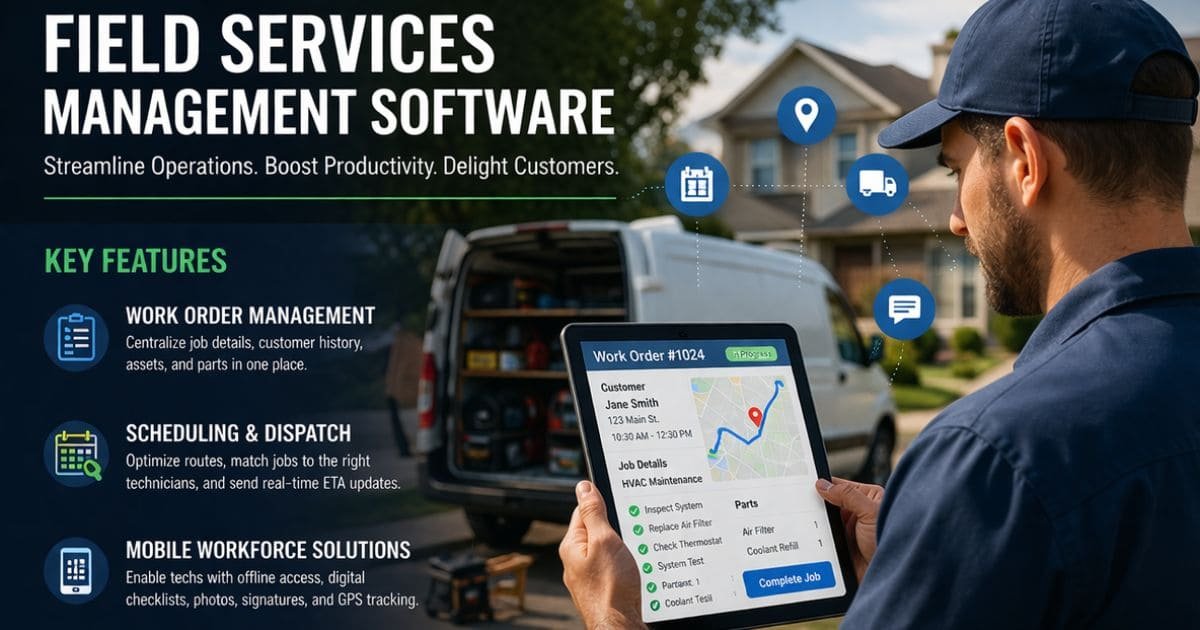
Field services management software organizes your schedules, dispatches, work orders, and customer communication so your team spends less time on admin and more time on productive work. You can cut response times, reduce travel costs, and improve customer satisfaction by choosing a solution with real-time tracking, route optimization, inventory controls, and integrated job management.
This article walks through the key features to prioritize, the measurable benefits you should expect, and practical considerations for implementation so you can pick a tool that fits your operational scale and goals. Dive in to compare capabilities, avoid common pitfalls, and start turning field operations into a reliable competitive advantage.
Key Features of Field Services Management Software
You need reliable job tracking, optimized schedules, and real-time mobile tools to keep technicians productive and customers satisfied. The sections below break down how work order workflows, dispatch logic, and mobile capabilities deliver those outcomes.
Work Order Management
Work order management centralizes job details so your team knows what to do before they arrive. A good system captures customer contact data, site history, asset serial numbers, warranty status, photos, and required parts on a single card.
Use templates and checklists to standardize repeatable tasks and reduce variance between technicians. Automated status updates (created, assigned, in progress, completed) reduce phone tag and keep dispatchers and customers informed.
Integrations with inventory and billing let you reserve parts when a job is scheduled and push labor/parts to invoices after completion. Searchable archives and audit logs help you track compliance, estimate return visits, and analyze recurring failure patterns.
Scheduling and Dispatch
Scheduling tools match jobs to technicians based on skills, certifications, location, and current workload. You should be able to set rules—priority levels, travel-time limits, and mandatory certifications—to filter eligible technicians automatically.
Drag-and-drop dispatch boards and automated routing reduce idle miles. Real-time traffic-aware route optimization recalculates when delays occur, improving on-time performance.
Include SLAs and ETA notifications so customers receive accurate arrival windows. Use shift templates, overtime rules, and capacity planning to avoid overbooking and to model staffing needs during peak seasons.
Mobile Workforce Solutions
Mobile apps put job data, manuals, and customer signatures directly in your technicians’ hands. Offline capability matters: the app must let techs access and edit work orders without connectivity and sync changes when they return online.
Provide step-by-step repair guides, parts lookup, and barcode scanning to speed diagnosis and parts consumption. Capture photos, time logs, digital signatures, and GPS stamps at job completion to validate work and speed invoicing.
Secure role-based access controls protect sensitive customer and asset data on devices. Push notifications for new jobs, reassignments, and parts shortages keep field teams responsive and reduce administrative overhead.
Benefits and Implementation Considerations
You’ll see how improved customer interactions, seamless system connections, and strong data controls directly affect day-to-day operations and regulatory risk. The next parts explain what to prioritize and which trade-offs to expect.
Enhancing Customer Experience
You improve first-time fix rates and reduce repeat visits by equipping technicians with mobile access to job history, parts availability, and diagnostic guides. Real-time ETAs and automated SMS/email updates lower missed appointments and boost transparency for customers.
Use self-service portals and online scheduling to let customers book windows that match technician routes, reducing downtime and cancellations. Capture customer signatures and photos on site to speed invoicing and dispute resolution.
Measure impact with these metrics:
- First-time fix rate
- Average arrival-time variance
- Customer satisfaction (CSAT) per technician
Prioritize user-friendly mobile interfaces and template-driven communications to maintain consistency across technicians and channels.
Integration With Existing Systems
You need bi-directional data flows between FSM and core systems: ERP for inventory and billing, CRM for customer records, and accounting for revenue recognition. Define canonical data fields (customer ID, asset ID, part SKU) to avoid mismatches and duplicate records.
Plan integration using an API-first approach or middleware/ESB if you have multiple legacy systems. Map workflows before development: identify which system is the system of record for each entity and which actions must be synchronous versus asynchronous.
Test integration in a staged environment with sample data for peak-load scenarios. Maintain a small rollback plan and clear cutover steps to limit service disruption during deployment.
Data Security and Compliance
You must secure technician devices, customer records, and IoT telemetry with layered controls: device management, encryption at rest and in transit, and role-based access controls. Enforce strong authentication (MFA) for dispatch and field logins.
Address regulatory requirements relevant to your region and industry—PCI for payments, HIPAA for healthcare, GDPR/CCPA for personal data—by minimizing stored sensitive data and keeping audit logs for access and changes. Regularly run vulnerability scans and penetration tests on the FSM platform and connected APIs.
Maintain an incident response playbook that covers notification timelines, forensic steps, and customer communication. Assign clear ownership for security patching and data retention policies so you reduce both operational risk and compliance exposure.
Beriful do not guarantee the accuracy or completeness of this information and are not liable for any loss, damage, or consequences resulting from its use.